
Table of Contents
- What the SE / 5E Error Means
- Common Symptoms
- What Causes the SE / 5E Error
- Safety Warning
- Related Samsung Microwave Error Codes
- Where to Find Your Manual
- Step-by-Step Troubleshooting
- Replacement Parts You May Need
- Model Specs to Check Before Ordering Parts
- Warranty Considerations
- Preventive Maintenance
- DIY Tutorial: Cleaning the Ribbon Cable
- FAQ
What the Samsung Microwave SE / 5E Error Means
Direct answer: The SE error (sometimes displayed as 5E) on a Samsung microwave means the control board has detected a “key short” — it thinks a button on the touchpad is stuck or being pressed continuously. It’s almost always caused by a stuck key, a dirty or worn membrane switch, or a loose ribbon cable connecting the touchpad to the control board, not a major electrical failure.
At TechSolved, this is one of the most common Samsung microwave complaints we cover, and the good news is that most cases don’t require a repair technician at all.
Common Symptoms of the SE / 5E Error
Before you assume the worst, check whether your microwave is showing any of these tell-tale signs:
- The display shows SE or 5E and won’t clear with the touchpad
- The unit beeps repeatedly and locks out all other functions
- One physical button feels like it’s sitting slightly lower than the others
- The error clears temporarily after unplugging, then comes back within minutes or hours
- The microwave occasionally starts running on its own, even with the door closed and no one pressing anything
- A “re-h” or reheat-cycle message flashes briefly before reverting to SE
If you’re seeing the self-starting symptom, treat this as a priority fix — see the safety section below.
What Causes the SE / 5E Error on a Samsung Microwave
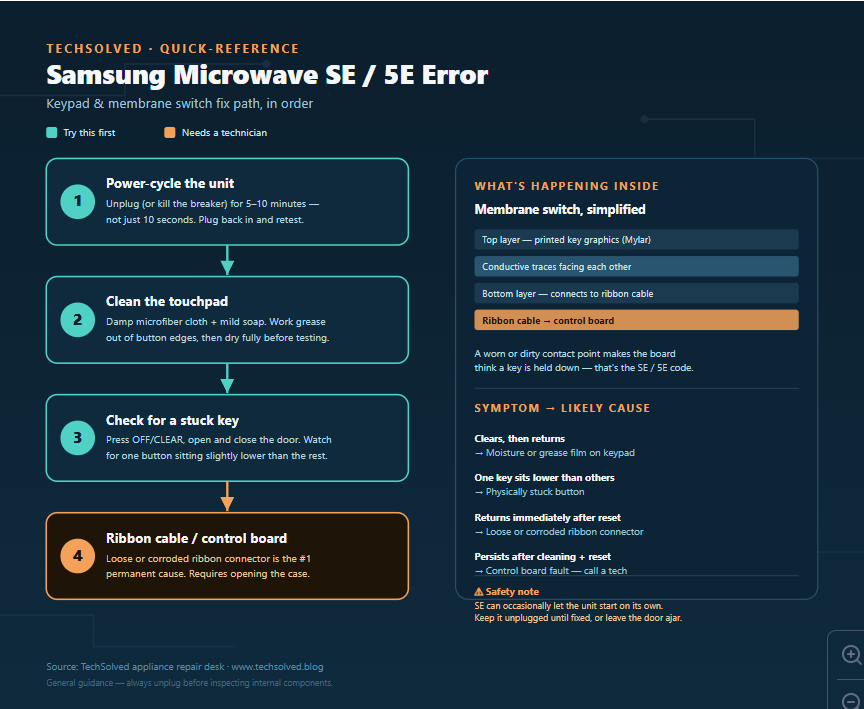
The touchpad on most Samsung microwaves is a membrane switch: two thin layers of flexible plastic film with conductive coating facing each other. Pressing a button physically presses those layers together, closing a circuit and sending a signal to the control board. When that circuit gets stuck closed — for any of the reasons below — the board reads it as a permanently pressed key and throws the SE/5E code.
- A genuinely stuck key. Grease, food residue, or a spill can glue the layers of the membrane together under one button so it never fully releases.
- Moisture behind the panel. Steam from cooking, especially on over-the-range models mounted above a stovetop, works its way into the seams around the touchpad over time.
- Worn conductive coating. On heavily used buttons (Start, 30-second-add, popcorn presets), the conductive layer inside the membrane can degrade with age and start misreading presses.
- A loose or dirty ribbon cable. The touchpad connects to the control board through a flat ribbon cable. Dust, corrosion, or a connector that’s worked itself slightly loose can cause the same “key short” signal without any button actually being stuck.
- Control board fault. Less common, but if the touchpad and ribbon both test clean, the board itself may be misreading input.
Safety Warning
Read this before you touch anything inside the unit.
- A microwave’s high-voltage capacitor can hold a lethal charge even when unplugged. Never open the outer case or touch internal components unless you’re trained to safely discharge it first. Everything in the troubleshooting section below is designed to stay outside that danger zone — cleaning the visible touchpad and, at most, accessing the control panel’s ribbon connector from the front, not the magnetron or capacitor compartment.
- SE errors have been reported to cause a microwave to start on its own. Until the error is resolved, keep the unit unplugged when not actively testing it, or leave the door propped slightly open so the interlock switch prevents it from running.
- If you’re not comfortable with basic appliance disassembly, stop after the cleaning and reset steps and call a licensed appliance technician for anything involving the ribbon cable or control board.
Related Samsung Microwave Error Codes
SE/5E is a keypad-specific code, but it’s often confused with other Samsung microwave errors. Here’s how to tell them apart:
| Code | What It Means |
|---|---|
| SE / 5E | Key short / stuck keypad error (covered in this article) |
| dE / dE2 | Door switch error — the control senses the door isn’t sensed as properly closed |
| E-21 / E-24 | Humidity or steam sensor communication error |
| PF | Power failure — power was interrupted mid-cycle |
| HL | Recommended cleaning cycle reminder, not a fault |
Where to Find Your Manual
Samsung publishes model-specific user manuals and service guides on its official support site. Search using your exact model number, found on a sticker inside the door frame or on the back panel (format is usually something like ME21R7051SS or MG14H3020CM). The manual’s troubleshooting section will confirm whether SE/5E applies to your specific model, since Samsung has used slightly different code displays across product generations.
Step-by-Step Troubleshooting
Work through these in order — most SE/5E errors resolve in the first two steps.
Step 1: Full power reset
Unplug the microwave, or switch off the breaker if it’s hardwired, and leave it completely without power for 5 to 10 minutes. A quick 10-second unplug often isn’t enough to fully clear the control board’s memory. Plug it back in and test a basic function immediately.
Step 2: Deep-clean the touchpad
Dampen a soft microfiber cloth with warm water and a drop of mild dish soap — never spray liquid directly onto the panel. Wipe the entire touchpad, working carefully around the edges of each button where grease tends to collect. Dry completely with a separate cloth before plugging back in. Even a thin, invisible film of residue is enough to trigger the error.
Step 3: Check for a physically stuck button
With the unit unplugged, look closely at the keypad from an angle. A stuck key will often sit very slightly lower than its neighbors. Gently press and release each button a few times to see if one feels different — spongier, or like it doesn’t spring back the same way.
Step 4: Check the environment
If this is an over-the-range model, confirm it isn’t getting regularly hit with steam from a pot on the stove below. Repeated steam exposure is one of the leading causes of early keypad failure on OTR units.
Step 5: Inspect and reseat the ribbon cable
If the error keeps returning immediately after a reset, the ribbon cable connecting the touchpad to the control board may be loose or corroded. This requires removing the outer control panel screws (see the DIY tutorial below) — stay well clear of the high-voltage compartment.
Step 6: Call a technician
If cleaning, resetting, and reseating the ribbon cable don’t resolve it, the touchpad membrane or control board likely needs replacement. At that point it’s a parts-and-labor job better suited to a licensed technician, both for safety and because misdiagnosing the board versus the touchpad wastes money.
Replacement Parts You May Need
If the touchpad itself is confirmed faulty, you’re looking for a membrane switch / touchpad assembly, not the entire control board. Common Samsung OEM part numbers referenced for microwave touchpad replacements include DE34-00304H, DE34-00330C, and DE94-02948A — but numbers are model-specific, so cross-reference your exact model number against the manufacturer’s parts lookup before ordering. Installing the wrong touchpad assembly is one of the most common, and most expensive, DIY repair mistakes.
How to Read Your Samsung Microwave Model and Serial Number
Model Specs to Check Before Ordering Parts
Before buying a replacement touchpad or scheduling a repair, have these details ready:
- Full model number (e.g., ME21R7051SS/AA) — the suffix after the slash matters for part compatibility
- Serial number — helps identify production run differences within the same model
- Install type — over-the-range (OTR) vs. countertop, since touchpad assemblies differ between them
- Panel color/finish — stainless, black stainless, white, or black, since the overlay graphic is finish-specific
Warranty Considerations
Samsung microwaves typically carry a 1-year limited warranty on parts and labor, with some models offering extended coverage on the magnetron specifically (not the touchpad). If your unit is still within that first year, contact Samsung support before attempting any repair that could void coverage — check your model’s warranty card for exact terms, since windows vary by product line. Repairs by unauthorized third parties on an in-warranty unit can void remaining coverage, so confirm your status first.
Preventive Maintenance to Avoid Future SE/5E Errors
- Wipe the touchpad weekly with a barely-damp microfiber cloth, drying it fully afterward
- Avoid spraying cleaner directly onto the control panel; apply it to the cloth instead
- For OTR models, use a stove vent hood or shift steaming pots to a back burner when possible
- Don’t let food splatters near the keypad sit for more than a day before cleaning
- Periodically check that no single button shows more wear or looseness than the others
DIY Tutorial: Accessing and Cleaning the Ribbon Cable Connector
Only attempt this if Steps 1–4 above didn’t resolve the error, and only if you’re comfortable with basic appliance disassembly.
- Unplug the microwave completely. Confirm the outlet is dead before proceeding — do not rely on the power switch alone.
- Locate the control panel housing. On most Samsung models, this is accessed by removing the screws along the top edge of the control panel fascia (for OTR models) or the rear/top panel screws (for countertop models). Check your service manual for exact screw locations, since this varies by model.
- Gently separate the control panel from the housing, keeping the ribbon cable intact — do not pull the panel free before you can see how the cable connects.
- Locate the ribbon cable connector on the control board. It’s a flat, wide plastic clip holding a thin ribbon in place.
- Open the small locking clamp on the connector (usually flips up or slides) and gently slide the ribbon out.
- Clean the ribbon contacts using a pencil eraser or an isopropyl-alcohol-dampened cotton swab, working gently in one direction to avoid tearing the ribbon.
- Reinsert the ribbon fully and squarely into the connector before closing the locking clamp — an incompletely seated ribbon is a common cause of recurring errors after this exact repair.
- Reassemble the panel, plug the unit back in, and test.
Stop immediately and call a technician if you see any sign of the ribbon being torn, if the connector itself is cracked, or if reaching the connector would require going near the magnetron or the large capacitor block — those steps go beyond a homeowner-safe repair.
Frequently Asked Questions
Is the SE error the same thing as the 5E error on a Samsung microwave?
Yes. SE is frequently misread as 5E depending on the display font and viewing angle, but Samsung’s control board logs them as the same key-short fault. The fix process is identical either way.
Can I keep using my Samsung microwave while it’s showing the SE error?
It’s not recommended. Some units with a stuck key have been reported to start running on their own, which is a fire risk. Unplug the microwave until you’ve resolved the error, or leave the door open slightly so the safety interlock keeps it from starting.
Will a factory reset fix the SE/5E error permanently?
A power reset (unplugging for 5–10 minutes) can clear the error temporarily, but if the underlying cause is a stuck key, moisture, or a loose ribbon cable, the code will typically return until that root cause is addressed.
How much does it cost to replace a Samsung microwave touchpad?
Parts alone typically run in the range of home-improvement-store minor-appliance-part pricing, with professional installation adding labor cost on top. Exact pricing depends heavily on your specific model, so get a quote based on your model number rather than a general estimate.
Is it safe to open my microwave myself to check the ribbon cable?
Cleaning the visible touchpad is safe for anyone. Opening the case to access the ribbon connector is a step up in risk — it’s safe if you stay away from the capacitor and magnetron compartment entirely, but if you’re not confident identifying those components, it’s worth paying a technician instead.
Does cleaning the touchpad with the wrong product make the SE error worse?
Yes — spraying liquid cleaner directly onto the panel (rather than onto a cloth) can push moisture behind the membrane switch, which can trigger or worsen the exact error you’re trying to fix.
Why does my Samsung microwave keep showing SE even after I replaced the touchpad?
This usually points to an incompletely seated ribbon cable connector rather than a bad new part — reopen the panel and confirm the ribbon is pushed in fully and squarely before the clamp is closed.
Found this guide helpful? TechSolved covers Samsung, LG, GE, and Whirlpool appliance error codes every week. Browse more fixes at www.techsolved.blog, and check out our related guide to the Samsung dE/dE2 door switch error if your microwave is throwing multiple codes.